
应一位学员的要求,讲一下这种模式的项目部署,这种部署模式应该叫 合并部署
之前虽然讲过很多的项目部署
有使用supervisor部署的
https://www.bilibili.com/video/BV1Uc411E7YV/?spm_id_from=333.1387.upload.video_card.click
有使用docker部署的
https://www.bilibili.com/video/BV1HH4y1W7H4/?spm_id_from=333.1387.upload.video_card.click
也有讲通过docker-compose一键部署的
https://www.bilibili.com/video/BV1Q64deTEyR/?spm_id_from=333.1387.upload.video_card.click
但是都是属于前后端分开部署的
所以弥补一下这方面的缺失
然后就是项目部署它是一个很泛的知识,需要很多知识的结合
- 要熟悉linux的基本命令
- 基本要熟悉docker
- 对网络要懂
- nginx要熟悉
所以你们在学习项目部署之前,最好去学习一下对应的知识点,我的哔哩哔哩都有对应的基础课程
基本上看他的描述,大概率能猜到他为什么没有跑通,大概率是路径的问题,然后api调不通
写个简单的demo,前端我用vue3写一个页面,通过axios请求后端一个接口,然后展示到页面上,后端写一个接口返回数据
后端
package main

import "github.com/gin-gonic/gin"

func UserList(r *gin.Context)  {
  r.JSON(200, gin.H{
    "code": 0,
    "msg": "成功",
    "data": []gin.H{
      {
        "id": 1,
        "name": "枫枫",
        "age": 21,
        "addr": "湖南长沙",
      },
      {
        "id": 2,
        "name": "枫枫",
        "age": 25,
        "addr": "四川成都",
      },
    },
  })
}

func main()  {
  r := gin.Default()
  r.GET("/api/users", UserList)
  r.Run(":8080")
}
前端
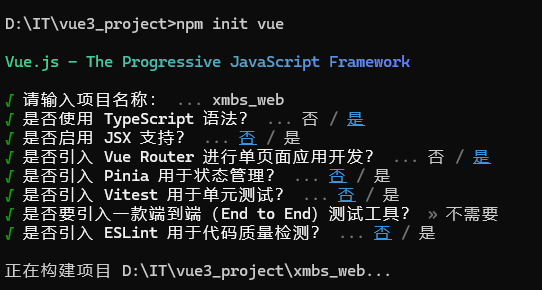
用了ts,用了vue-router
然后配置前端代理
因为开发环境,直接请求后端会跨越
注意:打包之后,这个开发配置就没用了
import {fileURLToPath, URL} from 'node:url'

import {defineConfig} from 'vite'
import vue from '@vitejs/plugin-vue'

// https://vitejs.dev/config/
export default defineConfig({
    plugins: [
        vue(),
    ],
    resolve: {
        alias: {
            '@': fileURLToPath(new URL('./src', import.meta.url))
        },
    },
    server: {
        proxy: {
            "/api": {
                target: "http://127.0.0.1:8080",
                changeOrigin: true,
            }
        }
    }
})
<script setup lang="ts">
import axios, {type AxiosResponse} from "axios";
import {ref} from "vue";
interface baseResponse<T> {
  code: number
  msg: string
  data: T
}
interface userType {
  "addr": string
  "age": number
  "id": number
  "name": string
}
const data = ref<userType[]>([])
async function getUsers(){
  const res :AxiosResponse<baseResponse<userType[]>> = await axios.get("/api/users")
  data.value = res.data.data
}

getUsers()
</script>

<template>
  <div>
  <h3>用户列表</h3>
    <table>
      <thead>
      <tr>
        <th>ID</th>
        <th>昵称</th>
        <th>年龄</th>
        <th>地址</th>
      </tr>
      </thead>
      <tbody>
      <tr v-for="item in data">
        <td>{{ item.id }}</td>
        <td>{{ item.name }}</td>
        <td>{{ item.age }}</td>
        <td>{{ item.addr }}</td>
      </tr>
      </tbody>
    </table>
  </div>
</template>
确保你在开发模式下能正常看到数据

然后构建得到dist目录
把它放到后端的static目录,做静态文件映射
但是这里会有个问题,那就是映射的目录不能直接写
r.Static("/", "static/dist")
会报错
得改成正常的目录才行
r.Static("/static/dist", "static/dist")
但是这样子,发现访问 http://127.0.0.1:8080/static/dist/index.html 页面是空白的
原因很简单,因为他会请求根目录的 /assets的文件
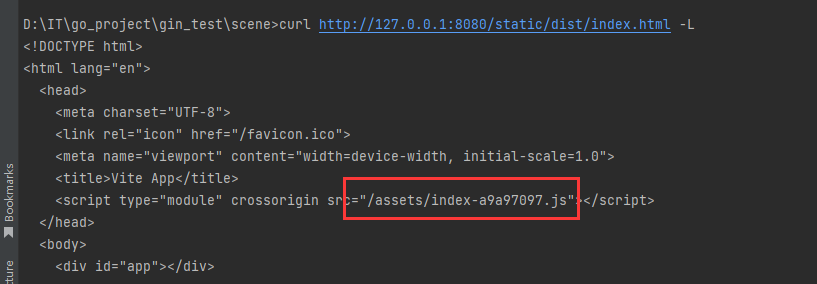
当然,你完全可以改成
<script type="module" crossorigin src="/static/dist/assets/index-a9a97097.js"></script>
但是,这种做法很明显不通用,并且也太low了
解决办法也很简单
  r.Static("/assets", "static/dist/assets")
  r.Static("/favicon.ico", "static/dist/favicon.ico")
  r.GET("/", func(c *gin.Context) {
    c.File("static/dist/index.html")
  })
  r.NoRoute(func(c *gin.Context) {
    c.File("static/dist/index.html")
  })