函数是一种可重复使用的代码块
函数是一种非常重要和常用的语言特性,可以用于封装代码、抽象功能、提高代码的可读性和可维护性等
例如经常使用的 console.log函数,它的功能就是将变量打印到控制台上,我们只需要调用这个函数即可,而log函数考虑的就很多了
函数声明和调用
- function声明
function hello() {
    console.log("hello")
}
hello()
- 匿名函数
const say = function (){
    console.log("say")
}
say()
- 箭头函数
const eat = ()=>{
    console.log("eat")
}
eat()
- 立即执行函数
(function (){
    console.log("立即执行")
})()
函数参数
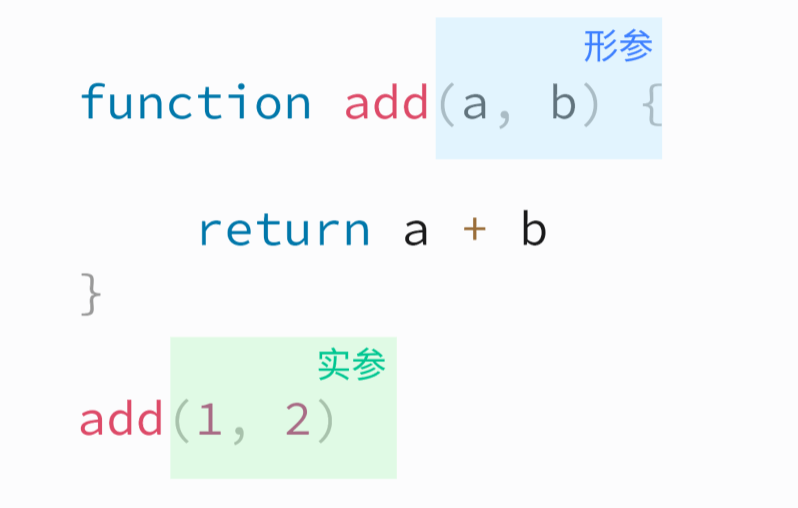
形参:形式上给函数声明的参数
实参:实际给函数传递的参数
function add(a, b){
    return a + b
}

console.log(add(1,2))
默认参数
如果对应的参数没有被赋值,那么对应的参数就是undefined
function getName(name="feng"){
    // if (name === undefined){
    //     return "feng"
    // }
    // name = name || "feng"
    return name
}
参数列表
形参和实参的传递是一一对应的,剩余的被参数列表接收
function sum(...list) {
    let res = 0
    for (const listElement of list) {
        res += listElement
    }
    return res
}

console.log(sum(2, 3))
console.log(sum(2, 3, 2, 3, 45))
arguments
完整的参数列表,是一个类数组
function sum1() {
    let res = 0
    for (const listElement of arguments) {
        res += listElement
    }
    return res
}
console.log(sum1(2, 3))
console.log(sum1(2, 3, 2, 3, 45))
函数返回值
- 没有显式return等于return undefined
function set(){

}

console.log(set()) // undefined
函数作为变量
函数自身也可以作为参数,放入对象、数组中
function getName(){
    return "fengfeng"
}

const lis = [1,"sss", getName]
console.log(lis[2]())
如果函数在对象中,此时它就叫方法
const obj = {
    name: "fengfeng",
    eat: function (){
        return `${this.name}在吃饭`
    },
    say: ()=>{
        // 监听函数中不能用this
        console.log("在说话")
    },
    study(){
        console.log(`${this.name}在学习`)
    }
}

console.log(obj.name)
console.log(obj.eat())
obj.say()
obj.study()
递归函数
在函数中调用自身
一定要设置退出条件
示例:展开所有的数组,变成一维数组
const list = [
        "你好", "吃饭了吗",
        [
            "好",
            [
                [
                    "abc"
                ]
            ]
        ]
    ]
写法1
const a1 = []
function oneArray(array){
    for (const arrayElement of array) {
        if (arrayElement instanceof Array){
            oneArray(arrayElement)
            continue
        }
        a1.push(arrayElement)
    }
}
oneArray(list)
console.log(a1)
写法2
function oneArray1(array){
    const a2 = []

    function _oneArray(array){
        for (const arrayElement of array) {
            if (arrayElement instanceof Array){
                _oneArray(arrayElement)
                continue
            }
            a2.push(arrayElement)
        }
    }
    _oneArray(array)
    return a2
}

console.log(oneArray1(list))
有非常多的方法
function oneArray2(array){
    const a3 = []
    for (const arrayElement of array) {
        if (arrayElement instanceof Array){
            a3.push(...oneArray2(arrayElement))
            continue
        }
        a3.push(arrayElement)
    }
    return a3
}

console.log(oneArray2(list))
this问题
this指向
- 函数外:window
- 函数内:函数中的this指向谁,取决于这个函数是怎么调用的
- 箭头函数没有this或者this是window
this指向修改
function.call()
function.call(this指向谁, 参数1,参数2...)
// 调用函数,并修改函数中的this指向;
function.apply()
function.apply(this指向谁, [参数1, 参数2...])
// 调用函数,并修改函数中的this指向
function.bind()
function.bind(指向,参数1,参数2,...)
// 绑定this指向
箭头函数的this不能修改
function get() {
    console.log("get", this, arguments)
}
const set = ()=>{
    console.log("set", this)
}

const obj = {
    name: "fengfeng",
    get: get,
    set: set,
}

get()
obj.get()
set()
obj.set()


// 改变this

get.call(obj, 1,2,3)
get.apply(obj, [1,2,3])
get.bind(obj, 1,2,3)(4,5,6)


// 箭头函数没有办法修改this指向
set.call(obj, 1,2,3)
set.apply(obj, [1,2,3])
set.bind(obj, 1,2,3)(4,5,6)